
Comparing YouTube watch time vs views explains why raw view counts can be misleading.
Watch time and retention decide how far your videos travel and whether you get paid; raw views measure reach, not attention. YouTube’s August 2026 change to how it counts public views makes this distinction more important, not less. Chase watch hours and average view duration first, and treat your view count as context rather than the scoreboard.
TL;DR:
- Public views can now increase rapidly due to autoplay and hover previews, often inflating numbers without representing real viewer engagement.
- Watch time and average view duration are the key metrics that influence YouTube’s recommendations and monetization, not raw view counts.
- Achieving 4,000 watch hours requires about 60,000 views at an average view duration of four minutes, highlighting how view quality affects reach.
- Improving retention in the first 15 to 30 seconds and pacing the middle section are crucial strategies to extend session watch time and boost overall performance.
- Accurate analysis depends on separating genuine engaged views from inflated public view counts, especially after YouTube’s 2026 change.
Table of Contents
- What changed in 2026: public views versus engaged views
- Why watch time and retention drive recommendations and monetisation
- Worked examples: converting views and AVD into watch hours
- Practical tactics to increase watch time and retention
- How to measure and compare the right metrics in YouTube Studio
- How Greedier Social Media helps creators balance views and watch time
- Why the watch time obsession still gets misread
- YouTube Watch Time Vs Views: Sources
- FAQ
What changed in 2026: public views versus engaged views
On 24 August 2026, YouTube altered how the public view counter works. A view can now register from the moment a video starts playing, including autoplay and hover previews. The older, stricter counting method didn’t disappear; it was renamed engaged views, and it still requires a viewer to watch past that opening moment before it counts.
That distinction matters because public views can now climb faster than actual attention does. A Short that autoplays in someone’s feed for half a second can add to your public view total without anyone genuinely watching it.
- Public views: counted from play start, inflated by autoplay and hover behaviour
- Engaged views: the older logic, requiring deliberate continued watching, still visible in YouTube Studio
- Practical fix: export your analytics up to 23 August 2026, then start a fresh report from 24 August, so you’re never comparing pre-change and post-change numbers as though they were the same metric
Creators who skip that baseline step often panic over a sudden view spike that has nothing to do with real growth.
Why watch time and retention drive recommendations and monetisation
YouTube’s recommendation system runs on attention, not exposure. Watch time is the total number of hours viewers spend on your content, and average view duration (AVD) tells you how much of each video people actually stick around for, expressed as minutes or a percentage of runtime. Both sit in YouTube’s own metric definitions, alongside average view percentage and estimated minutes watched.
Monetisation eligibility runs on the same logic. To join the YouTube Partner Program, you need 1,000 subscribers plus either 4,000 public watch hours over 12 months on long-form videos or 10 million valid Shorts views over 90 days. Crucially, the public-view counting change hasn’t touched these thresholds; YPP eligibility still runs on qualified watch hours and qualified Shorts views, which follow the older, stricter engaged-view logic.
- Watch time (aggregate hours) signals whether people find your channel worth their time in bulk
- AVD and retention curves show quality per individual video
- Engaged views remain the number YouTube’s systems actually reward
A large majority of a video’s early recommendation potential hinges on how the first 15 to 30 seconds hold attention, according to TubeBuddy’s analysis of watch-time behaviour, which is exactly why session watch time consistently outweighs raw view counts in what gets pushed to more feeds.
Worked examples: converting views and AVD into watch hours
The maths behind watch-hour targets is simple once you strip it down to minutes rather than hours. Minutes needed equals your target hours multiplied by 60. Views needed equals minutes needed divided by your average view duration in minutes.
- Target: 4,000 watch hours = 240,000 minutes
- Short AVD example: at 30 seconds (0.5 minutes) average view duration, you’d need roughly 480,000 views to hit that target
- Longer AVD example: at 4 minutes average view duration, the same 240,000 minutes needs only 60,000 views
| Average view duration | Approximate views needed for 4,000 watch hours |
|---|---|
| 1 minute | 240,000 |
| 2 minutes | 120,000 |
| 4 minutes | 60,000 |
External calculators put a comparable estimate at 72,000–88,000 views to reach 4,000 hours under certain average-watch-time assumptions, which shows why the AVD you’re actually achieving changes the target dramatically. Run your own numbers with a watch-time calculator rather than relying on someone else’s average.
Practical tactics to increase watch time and retention
Retention gets built or lost in the first 15 to 30 seconds. Open with the payoff or the most visually striking moment rather than a slow logo intro, and make sure the thumbnail and title promise exactly what the video delivers. Mismatched expectations are the single fastest way to tank AVD, because viewers click away the moment they feel misled.
The middle of the video is where most drop-off happens, so vary pacing deliberately. Cut between B-roll and talking-head shots every few seconds, use chapters to signal structure, and resolve smaller narrative beats regularly rather than saving all the payoff for the end. A viewer who sees progress sticks around longer than one staring at a static shot for three minutes.

The ending is where you extend session watch time, not just close out the video. Point to a playlist that logically continues the topic, add an end screen recommending your next best video, and give a specific, single call to action rather than three competing ones.
Distribution matters too. Package your title, thumbnail and description to attract viewers who are actually likely to want the full video, not just click bait an algorithm will punish with poor retention. Pairing that packaging with sound video SEO practices helps the right audience find you in the first place, which matters because the wrong audience watching briefly hurts your retention curve more than a smaller, well matched audience watching fully.
- Hook in the first 15 to 30 seconds with the promised payoff, not a slow build
- Chapter and pace the middle third to reduce drop-off
- Use end screens and playlists to extend session watch time
- Target packaging at viewers likely to finish the video, not just click it
Pro Tip: Run a two-week retention test on just your thumbnail and opening ten seconds across three similar videos, then compare the audience retention graphs in YouTube Studio. A faster drop-off on one version usually points to a specific, fixable moment rather than a whole-video problem.
How to measure and compare the right metrics in YouTube Studio
YouTube Studio holds everything you need to separate reach from attention, provided you check the right reports rather than defaulting to the Overview tab’s headline number.
- Open the Engagement tab for watch time (hours), average view duration and average percentage viewed
- Check Audience retention graphs on individual videos to spot exact drop-off points
- Use Traffic sources to see whether views are coming from suggested videos, search or external links, since each source behaves differently for retention
- Export an Advanced report covering the period before 23 August 2026 as your baseline, then a second export starting 24 August, keeping public views as a separate column from engaged views
- In a spreadsheet, calculate engaged-view rate as engaged views divided by public views, multiplied by 100, to see what share of your views represent genuine watching
- Calculate subscriber conversion rate as new subscribers divided by views for the same period, to see whether growth is translating into audience
For deeper reporting or automated exports, Google’s developer documentation lists every metric name the API returns, including estimatedMinutesWatched and engagedViews, which is worth bookmarking if you’re building your own dashboard rather than relying on Studio’s default views.
How Greedier Social Media helps creators balance views and watch time
Greedier Social Media has worked with creators and small businesses since 2013, and one pattern shows up repeatedly: channels that chase view counts alone plateau faster than channels that pair visibility with retention-focused content decisions.
Our approach pairs exposure tactics, real views and engagement delivered without ever asking for a password, with practical guidance on the retention work that actually keeps YouTube’s recommendation engine on your side. Buying views can genuinely help a new video clear the initial visibility threshold that YouTube’s algorithm uses to decide whether to test it with a wider audience, but it works best alongside the hooks, pacing and packaging covered above, not instead of them.
- Real, UK targeted views and engagement, delivered instantly and without password access
- Guidance on combining exposure with retention tactics rather than relying on either alone
- Transparent practices that align with YouTube’s own policies rather than working against them
If you’re weighing up how to buy YouTube watch hours without unnecessary risk, start with a clear picture of your current AVD and retention curve first. For a broader plan that covers growth beyond a single metric, our guide to social media growth tactics walks through how exposure and engagement work together across platforms.
Why the watch time obsession still gets misread
Most advice on this topic treats watch time as a target to hit and views as a vanity number to ignore. Both halves of that are too simple. Watch time is the metric YouTube’s systems actually reward, but the reason it works is that it’s a proxy for something harder to fake: whether a stranger, scrolling fast, decided your video was worth their attention.
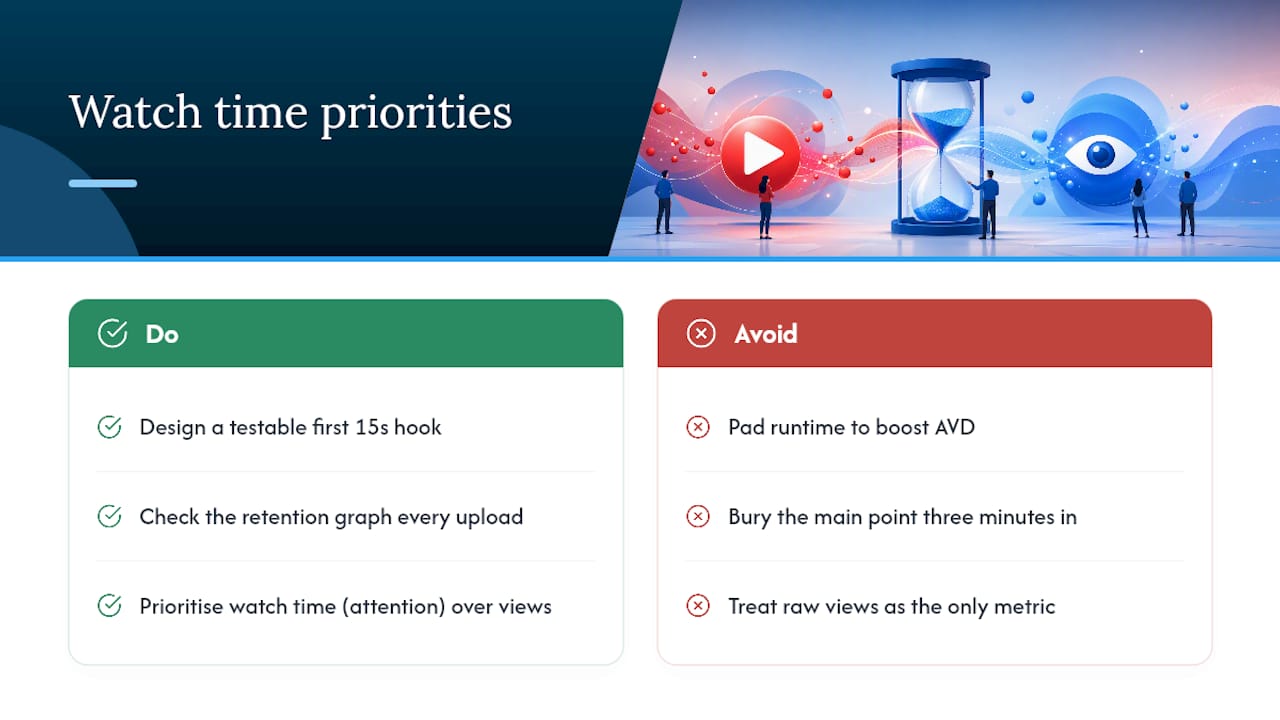
That’s the part conventional advice misses. Chasing higher AVD by padding runtime or burying the point three minutes in doesn’t fool retention graphs; it just produces a slower drop-off curve that still reads as weak. The 2026 counting change makes this more visible, not less, because it splits exposure from attention into two separate numbers you can actually compare.
If there’s one thing to prioritise, it’s building your first 15 seconds around a specific, testable hook, then checking the retention graph on every upload before you touch anything else. Views tell you whether people found the video. Watch time tells you whether it deserved to be found.
— Luna
YouTube Watch Time Vs Views: Sources
- What are ‘Engaged’ Views on YouTube?
- YouTube Analytics metrics — Developers.Google
- YouTube Watch Time – Metric Definition
- YouTube Watch Time Calculator
- YouTube watch time: What it is, why it matters, how to grow it – TubeBuddy
FAQ
How many watch hours is 10,000 views?
Watch hours depend entirely on average view duration; the total watch time increases as average view duration rises for the same number of views.
Do you need both 1,000 subscribers and 4,000 watch hours?
Yes, for the standard YouTube Partner Program route you need 1,000 subscribers plus 4,000 qualified public watch hours over the previous 12 months, or the Shorts-specific alternative of 10 million valid views over 90 days.
Does watching a YouTube video ten times count towards ten views?
Yes, repeat views from the same viewer generally do count towards the public view total, though YouTube’s systems are designed to detect and filter out artificial or repeated viewing that looks like manipulation rather than genuine rewatching.