
To avoid payment scams when buying followers, check the seller before you pay, pay by a method that protects you (never bank transfer), and never give anyone your social media password. A genuine growth service needs only your public username or post link. Anything that asks for more is either careless or a trap.
This guide is for UK small businesses, creators and marketers who are weighing up paid growth and do not want to lose money or an account along the way. It covers the scams that cluster around follower sites, the checks that take ten minutes, safe payment, password phishing and what to do if the worst happens.
TL;DR
- Never share your password. Delivery to a public profile or post needs a username or link, nothing else.
- Do not pay by bank transfer. Cards give you routes to recover money; transfers usually do not.
- Research the site: company details, terms, independent reviews and a sensible domain. A padlock proves nothing.
- Switch on two-step verification and use a unique three-random-words password before you buy anything.
- If you have paid a scammer or shared a password, contact your bank, change passwords and report it to Report Fraud.
Table of Contents
- Why follower-buying attracts scammers
- Ten-minute checks before you pay
- How to pay safely
- Why a growth site should never ask for your password
- Lock down your account before you buy
- What to do if you have already been caught out
- Our perspective: real engagement, no password, no pressure
- A safer way to start with us
- A quick checklist to keep
- FAQ
- Sources
Why follower-buying attracts scammers
Wanting quick visibility is normal, and that is exactly what scammers sell. A small business with a new Instagram page, a creator stuck at a few hundred followers or a marketer under pressure to show results will often search for a shortcut. Fraudsters know it, so they build sites, adverts and direct-message campaigns around that wish.
The government’s Stop! Think Fraud campaign warns that social media fraudsters may pose as real people or businesses through direct messages, adverts, quizzes or links to dubious websites designed to get personal information or money. In the growth niche this takes a few familiar forms:
- Fake follower packages. You pay, nothing arrives, and the site vanishes or stops replying.
- Fake growth managers. Someone messages you offering to “manage” your account, then asks for your login.
- Fake engagement platforms. A slick dashboard that exists mainly to collect your card details and credentials.
- Fake collaboration offers. A “brand” offers a paid deal, but first wants a fee or a click on a link.
Security researchers at Bitdefender list these same four patterns as the most common around paid followers. The examples are international, but the mechanics are identical in the UK.
There is a second, quieter risk: legitimate-looking sellers who simply do not deliver what they promise. The US Federal Trade Commission has described a case where one operator sold followers, subscribers, views and likes through several different websites, and it advises looking beyond follower counts to independent reviews and complaints. The lesson applies here: a polished storefront is not evidence of anything.
Ten-minute checks before you pay
Most payment scams fall apart under a few simple checks. Do these in order, and stop the moment something fails.
1. Read the web address character by character
Stop! Think Fraud lists a suspiciously similar domain as a warning sign of a fake site. Look for swapped letters, extra hyphens or an unusual ending. Type the address yourself rather than following a link from a direct message or an advert.
2. Look for real company information
A trustworthy seller tells you who they are, how to contact them and how long they have been trading. The same official guidance flags little company information, missing policies or terms, and poor design or spelling as red flags. If you cannot find a refund policy, terms of service or a contact route other than a chat bubble, treat it as a no.
3. Be wary of bargains and pressure
Bargain prices, incredible returns and countdown timers are all listed as warning signs. A fair price for real engagement is modest and visible. If a site promises 100,000 followers for the price of a coffee, ask yourself where those accounts come from.
4. Read independent reviews, plural
The Consumer Council advises researching unfamiliar sellers and reading customer feedback before you buy. Check several review sites, not only the testimonials on the seller’s own page, and search the company name alongside the word “complaints”.
5. Ignore the padlock
This catches many people out. HTTPS or a padlock only shows the connection is encrypted; it does not show the site is genuine or reputable. Scam sites have padlocks too.
6. Check how the service is delivered
Ask what the seller needs from you. A username or a post link is enough for followers, likes and views. If the form asks for your password, an email login or a verification code, close the tab. We cover this in detail below.
If you want a structured way to test a provider with little at stake, our password-free 14-day test for avoiding follower-buying scams walks through it step by step, and our list of warning signs of a bad follower service covers the red flags on the delivery side.
How to pay safely
Payment method matters more than most buyers realise, because it decides what you can do if something goes wrong.
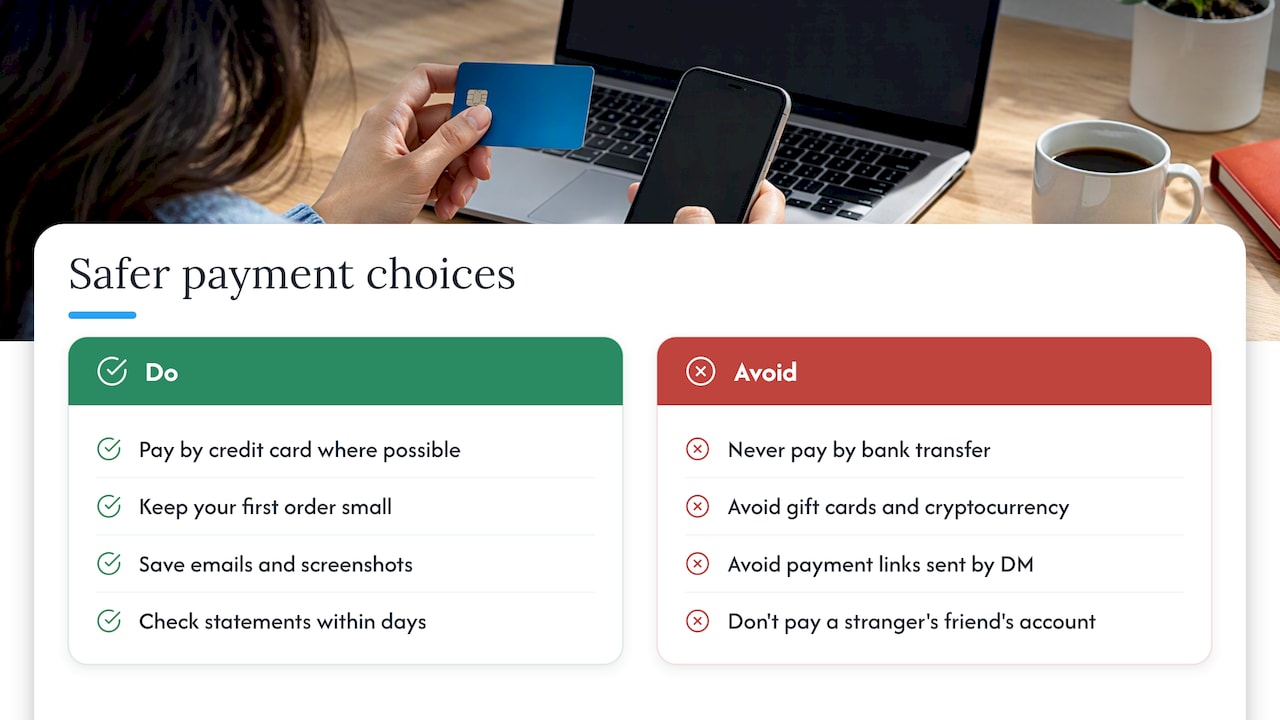
Never pay by bank transfer. The Consumer Council’s guidance is blunt: do not pay for goods by bank transfer, while card payments can give you rights to seek recovery. A UK government consumer guide likewise recommends a secure online payment method, paying by credit card where possible, and checking for HTTPS (bearing in mind that HTTPS alone proves little).
Be realistic about what a card gets you, though. MoneyHelper explains that section 75 of the Consumer Credit Act covers credit card purchases costing more than £100 and up to £30,000, and that the £100 threshold applies to each item. It does not cover debit card purchases; instead you can ask your bank about a separate scheme called chargeback. Many follower and like packages cost less than £100, so section 75 will often not apply. The practical point is simple: keep your first order small, pay by card, and keep every confirmation email and screenshot.
Watch for unusual payment requests. Gift cards, cryptocurrency, payment links sent over direct message or a request to “send it to my friend’s account” are all signs the deal is not what it claims to be. If a stranger on Instagram offers to grow your account and wants money first through a route you do not recognise, walk away.
Check your statements. After any purchase from a new site, look at your bank or card statement within a few days. Report anything you do not recognise to your bank straight away.
What a fair price looks like
Price is a useful sanity check. On our own site, published prices run from £1.99 to £229.99 one-off for Instagram followers, from £0.99 to £189.95 for Instagram likes and from £3.99 to £399.99 for TikTok followers, depending on the package size. Prices are listed openly before you check out, and the range between a small trial order and a large one is wide enough to let you start small. When a seller hides prices until you have given your details, or offers a number far below any market rate, that is a reason to be careful.
Why a growth site should never ask for your password
This is the single clearest dividing line between a safe service and a dangerous one. Followers, likes and views are added to a public profile or a public post. The seller does not need to log in as you to do it.
When a site asks for your login, it can do several things you never agreed to: change your email and password, lock you out, post spam from your account, message your followers or sell the account on. Password phishing is the mechanism: a fake login page or a polite request that harvests credentials.
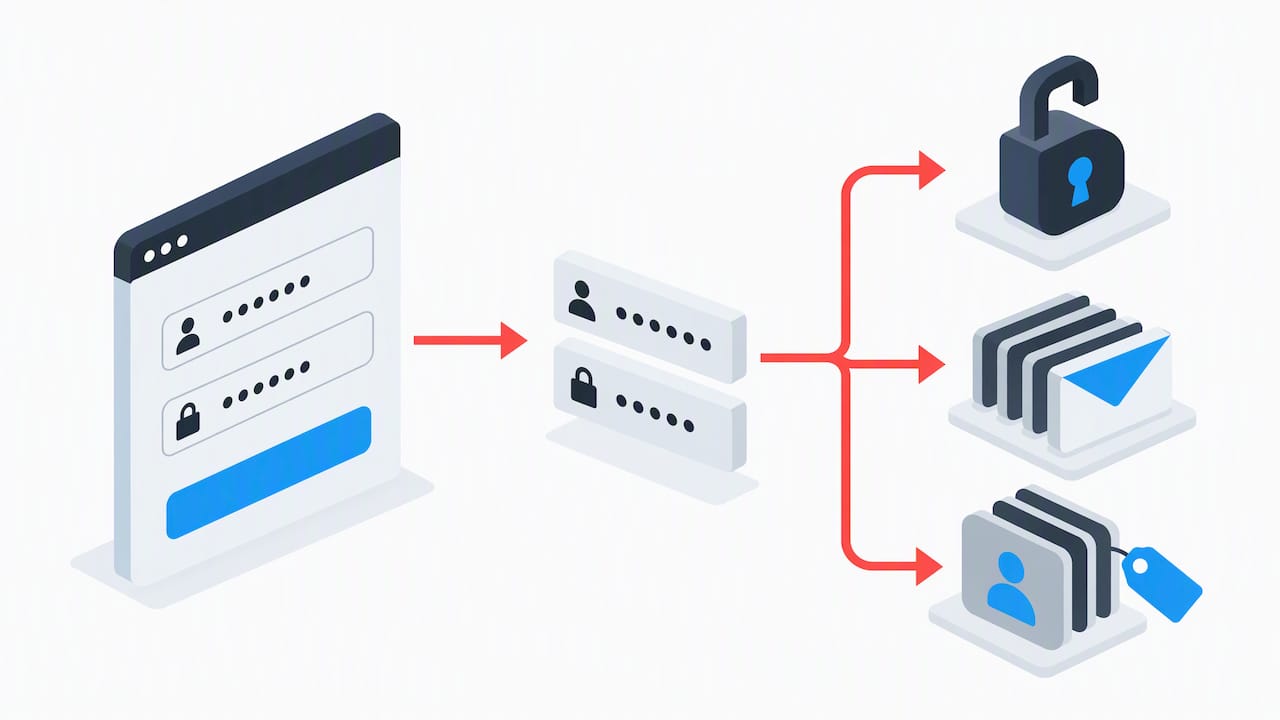
The National Cyber Security Centre explains that phishing can arrive by email, text, phone or social media and often impersonates a person or organisation you trust. GOV.UK advises against providing private information such as bank details or passwords, replying to uncertain texts or clicking links in emails whose genuineness you cannot confirm.
Signs of password phishing in the growth world
- A “verify your account to receive followers” page that asks you to log in to Instagram, TikTok or Facebook on the seller’s site.
- A direct message claiming your account is eligible for a verification badge or a brand deal, with a link to “confirm”.
- A “manager” who wants admin access or a shared login rather than using the platform’s own permission tools.
- A message that appears to come from the platform itself about a copyright issue or a policy breach, with an urgent deadline.
The NCSC also notes that criminals use personal information found online to make phishing messages more convincing, and it recommends thinking about what you post and reviewing your social media privacy settings. For public professional accounts, its guidance for high-risk individuals suggests considering management services so colleagues can post without sharing passwords. The principle holds for any business account: use the platform’s own role and permission features instead of passing credentials around.
Lock down your account before you buy
Even with a trustworthy seller, tighten your account first. It protects you from the scam you have not met yet.
- Use a strong, unique password. Stop! Think Fraud recommends a long password made from three random words, unique to each social media account and different from your email password.
- Never reuse passwords. The NCSC says criminals exploit reused, obvious and phishing-obtained passwords.
- Turn on two-step verification (2SV) on the account and on the email address linked to it.
- Review privacy settings and limit the personal details visible on your profile.
- Check follower requests and remove anything that looks automated or suspicious.
It takes less than half an hour and protects you whether or not you ever buy a package.
What to do if you have already been caught out
It happens to careful people. Speed matters, so act in this order.
If you paid a scammer
Contact your bank or card provider immediately and tell them what happened. The NCSC advises that if you provided banking details you should contact your bank, and that lost money should be reported to Report Fraud in England, Wales and Northern Ireland, or to Police Scotland in Scotland. GOV.UK gives the route: in England or Wales you can report lost money or hacking online or on 0300 123 2040.
If you shared your password or lost access
The NCSC’s guidance on recovering a hacked account gives a clear checklist:
- Contact the account provider (Instagram, TikTok, Facebook, YouTube) through its official recovery route.
- Check your email for forwarding rules you did not set up.
- Change the hacked password, and any other account that used the same one.
- Sign out of all devices and connected apps.
- Turn on 2-step verification and update your devices.
Where to report scams
GOV.UK lists several routes: forward suspicious emails to [email protected], send scam texts to 7726, and report misleading adverts, including those on social media, to the Advertising Standards Authority. Reporting does not always bring money back, but it helps shut down the operators and warn other people.
Our perspective: real engagement, no password, no pressure
We have been running since 2013 and have served over a million customers, and the same conversation comes up again and again. People are not afraid of buying growth so much as of being tricked while doing it. They have been burned by a site that took payment and went quiet, or they have been asked for a login and felt uneasy.
Our view is that the safe model is also the simple one. You give a public username or post link. You choose a package. You pay a published price. Nothing else is needed, and nobody should ask for your password. Because the product is meant to be real engagement rather than bots, we also think it is worth being honest about what paid growth can and cannot do: it can help a new page look established and lift visibility, but it does not replace good content, and it works best alongside it. If you want to read more on that balance, our guides on whether buying followers is safe and on authentic engagement versus fake followers go further.
Always start small, whichever seller you choose. A small order tells you more about delivery, support and honesty than any sales page can.
— Irwin Lee
A safer way to start with us
If you want to try paid growth without handing over anything risky, our packages are built around that rule: UK-targeted engagement, delivery without a password, and UK-based support if you have a question. You can browse Instagram packages from £1.99 for followers and from £0.99 for likes, or look at the TikTok, Facebook and YouTube ranges. Pick the smallest size, pay by card and see how it goes before ordering more.
A quick checklist to keep
| Check | Safe sign | Walk away if |
|---|---|---|
| Login details | Username or post link only | Asked for password, code or email login |
| Payment | Card, with a receipt | Bank transfer, gift cards, crypto, payment link in a DM |
| Price | Published before checkout | Hidden, or far below normal |
| Company details | Contact route, terms, refund policy | Chat bubble only, no terms |
| Reviews | Consistent across several independent sites | Only testimonials on its own page |
| Contact | Arrives through the site or a verified account | Unsolicited DM or advert with urgency |
FAQ
How can I tell if a follower site is a scam?
Look for bargain prices, pressure to pay quickly, requests for bank transfer, a domain that looks like another brand, thin company details and missing terms. Check several independent review sites rather than relying on the seller’s own testimonials. Remember that a padlock in the browser does not prove the site is trustworthy.
Do I ever need to give my password to get followers?
No. Followers, likes and views are added to a public profile or post, so a username or link is enough. A request for your password, a login on the seller’s own page or a verification code is a strong sign of phishing. If you have already shared one, change it and any account that reused it straight away.
What is the safest way to pay?
Use a card, never a bank transfer, and keep your first order small. Credit card purchases over £100 and up to £30,000 are covered by section 75, while debit card purchases may be eligible for chargeback through your bank. Keep receipts and screenshots in case you need to dispute a payment.
Where do I report a scam in the UK?
In England, Wales and Northern Ireland, report lost money to Report Fraud, and in Scotland to Police Scotland. Forward scam emails to [email protected] and scam texts to 7726. Misleading adverts on social media can be reported to the Advertising Standards Authority.
Sources
- Stay safe on social media, Stop! Think Fraud
- How to spot a fake website, Stop! Think Fraud
- Fake followers: a social media hoax, US Federal Trade Commission
- Instagram paid follower scams, Bitdefender
- How to spot, avoid and report scams, Consumer Council
- A guide for consumers: staying safe when you bank or shop online, GOV.UK
- Section 75 and chargeback protection, MoneyHelper
- Phishing scams: how to spot and report them, NCSC
- Avoid and report internet scams and phishing, GOV.UK
- Guidance for high-risk individuals, NCSC
- Using passwords to protect your devices and data, NCSC
- Recovering a hacked account, NCSC