
On Instagram Reels, plays and views are now the same number under one name. Meta renamed Reel and video Plays as Views in November 2024 and did not change how the number is calculated. If an old screenshot says “plays” and your insights now say “views”, you are looking at the same idea. The real confusion has moved: views are not viewers, and a high count does not tell you how many different people saw your Reel.
This guide explains what each term meant, what changed and when, what a view actually counts, and how to read the numbers so you make sensible decisions about your content.
TL;DR
- Plays became Views. Since November 2024, Instagram labels what used to be a Reel play as a view. The calculation stayed the same.
- A view is a start, not a person. Replays and repeat plays by the same account can each add to the count, so views can far exceed the number of people reached.
- Replays and Total Plays were retired. Meta planned to deprecate Plays, Replays and Total Plays in April 2025, so older reports and new ones are not perfectly comparable.
- Read views alongside reach and watch time. Reach counts each account once, which tells you whether the Reel travelled widely or was simply watched again and again.
Table of Contents
- What “plays” and “views” meant before the change
- What changed: plays became views
- What counts as a view on a Reel
- Views vs viewers vs reach
- Why reported totals jumped, and why it matters for engagement rates
- How to read your Reels insights now
- Our perspective
- When adding views makes sense
- Common mistakes when comparing plays and views
- FAQ
- Sources
What “plays” and “views” meant before the change
For a few years, Instagram showed different labels on different content. Reels and videos showed Plays. Feed photos, carousels and Stories showed Impressions or other counts. That meant a Reel and a carousel sitting next to each other in your insights were measured with different words, which made comparing formats awkward.
On Reels there were also three related numbers:
- Initial plays: the first time a Reel started after it appeared on someone’s screen.
- Replays: further starts after that first play, within the same session.
- Total plays: initial plays plus replays.
The definitions are documented by analytics vendors who worked from Meta’s data. Sprinklr’s glossary explains that a play was counted when the Reel started after an impression, with at least one millisecond of playback. A replay was another start after the initial play, with at least one millisecond, in the same Reel session. In other words, the bar was extremely low. A Reel that began to play and was scrolled past instantly still counted.
In June 2024, Meta added replays into the total-plays figure that third-party tools could pull. Sprout Social’s documentation of that update notes that it applied to Reels created after 1 January 2024 and that including replays could increase reported video-view and impression values. Some people saw their numbers jump overnight, and nothing about their content had changed.
What changed: plays became views
The shift happened in stages, so it helps to see it as a timeline.
| When | What happened |
|---|---|
| June 2024 | Total plays, including replays, became available in reporting for Reels created after 1 January 2024 |
| November 2024 | Meta renamed Reel and video Plays as Views, kept the calculation, and removed the separate Replays metric from reporting |
| 21 April 2025 | Meta planned to deprecate Impressions, Reel Plays, Replays and Total Plays in its API and introduce Views as the replacement |
| 28 October 2025 | Per Sprout Social, actual Reel Views became available for all Instagram Reels through the Meta API, whether or not the creator had authenticated |
The November 2024 and April 2025 steps are set out in Hootsuite’s summary of Meta’s announcement. The Zoomph help centre confirms the April 2025 deprecation and the move to Views. After that date, Sprinklr marks the old Reel metrics as deprecated, with no new data populated after 21 April 2025.
The October 2025 step matters for anyone who works with influencers or reports on other people’s Reels. Sprout Social’s influencer documentation says organic Instagram Impressions were deprecated in the Meta API, with paid data such as Meta Ads and Partnership Ads as exceptions.
Is a view the same as an old impression or play?
Roughly, but not exactly. Sprinklr’s changelog cautions that the newer Views metric is conceptually related to Impressions and Reel Plays but is not necessarily a one-to-one replacement, because the aggregation differs. So if you compare a Reel from early 2024 with one from this year, treat the comparison as a guide rather than a measurement. Compare your recent Reels with each other, using the same label and the same date range.
What counts as a view on a Reel
A view is an occurrence of the Reel appearing on a screen and starting to play. It is not a check that someone watched for three seconds, and it is not a count of people. Emplifi’s analytics guidance describes views as total occurrences, not deduplicated by user. Repeated appearances by the same person can therefore produce several views.
That answers the most common question people ask: does someone rewatching a Reel count as another view? Yes. Because views are not deduplicated, a second, third or tenth start by the same account can each add to the total. Since a Reel loops automatically, a person who leaves it on screen can also add to the count without doing anything.
It also answers the related question about your own activity. Because the metric counts occurrences and does not remove any one account from the total, your own plays are not obviously excluded from a raw count. If you want a cleaner read on your audience, do not rely on views alone. Use a unique-account number such as reach.
What does 100 views on a Reel mean?
The old phrase “100 plays” and today’s “100 views” mean the same thing: the Reel started playing 100 times. That could be 100 different people, or 40 people who each watched two or three times, or a handful of followers who looped it. Nothing in the number tells you which. On its own, 100 views is a small count and a reasonable starting point to compare against your own average, not proof of reach or of interest.
Views vs viewers vs reach
The gap that matters most today is between views and unique accounts. Emplifi explains that unique viewers are represented by Reach or a comparable metric, which counts each account once after it has seen the Reel. One person can contribute many views but only one unit of reach.
Sprout Social makes the same point in its Reels analytics guide: views include replays by the same users, so a high number does not by itself prove the Reel reached many distinct people. It recommends comparing views with unique-viewer or reach-style metrics and with watch time, to tell broad distribution apart from repeated or deeper viewing.
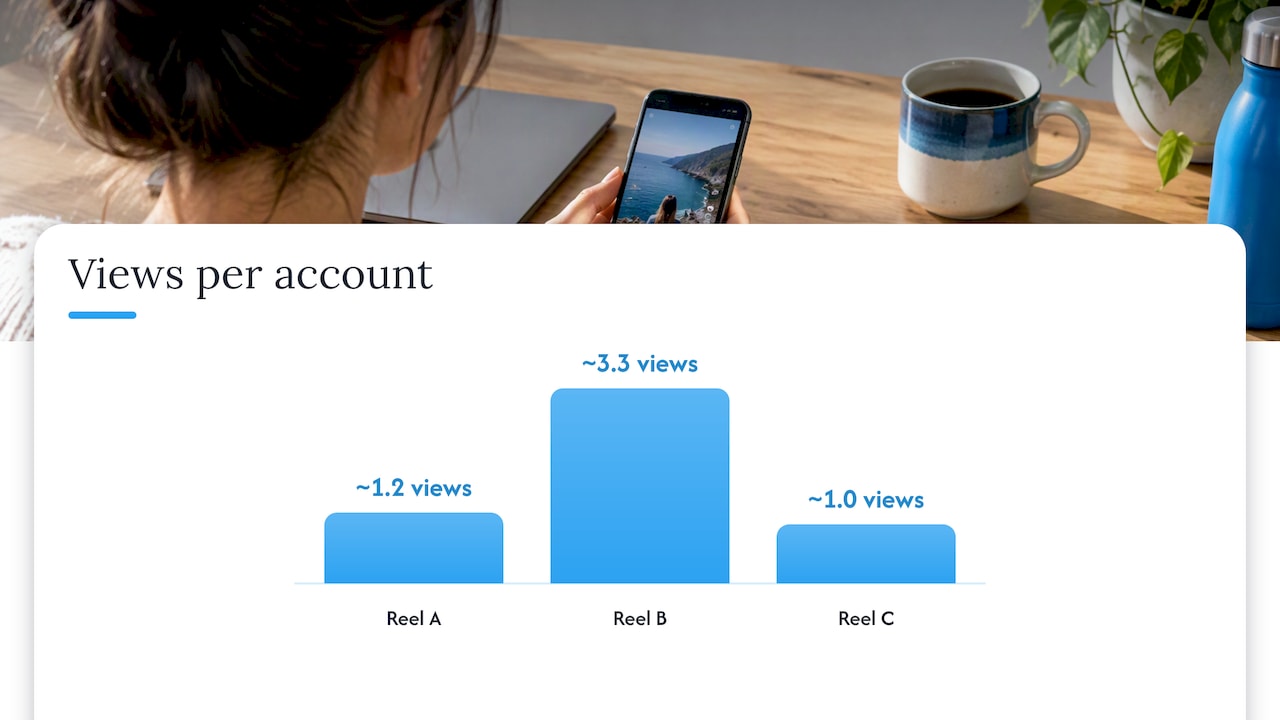
Here is a simple way to see it with made-up numbers for illustration:
| Reel | Views | Reach | Views per account | What it suggests |
|---|---|---|---|---|
| A | 5,000 | 4,200 | about 1.2 | Wide distribution, mostly single viewings |
| B | 5,000 | 1,500 | about 3.3 | Smaller audience watching repeatedly, or a loop that holds attention |
| C | 5,000 | 4,800 | about 1.0 | Wide but shallow: check watch time before celebrating |
None of these is automatically the “good” one. Reel A is what you want if you are trying to reach new people. Reel B might mean a tight loop or a tutorial people rewatch, which is useful for a different reason. Reel C needs a look at how long people stayed. If you want to dig into why a high view count can reflect repeat viewing rather than wide distribution, this guide to organic reach is a good companion read.
Why reported totals jumped, and why it matters for engagement rates
Many engagement rates divide interactions by impressions or plays. When replays were added to total plays, the denominator got bigger, and rates that relied on it shifted with no change in audience behaviour. Sprout Social’s June 2024 note makes this point: adding replays raises the reported totals used in impression-based calculations.
The practical lesson is to write down which denominator you use. If you report engagement as likes plus comments plus saves divided by views, say so, and keep it consistent. If you divide by reach instead, your rate will look higher, because reach is the smaller number. Neither is wrong, but mixing them across months makes trends meaningless. For a worked example of how the denominator changes a rate, see this look at promoting Instagram content across formats, which shows how reported figures feed into promotion decisions.
How to read your Reels insights now
A few habits make the new numbers useful.
- Open the Reel’s insights and note views and reach side by side. If reach is far lower than views, the audience is small and engaged or the Reel loops well.
- Check watch time and average watch time. A view that lasts a fraction of a second is counted the same as one that lasts the full Reel, so watch time is where quality shows.
- Look at interactions per view. Likes, comments, shares and saves relative to views show whether the people who started the Reel cared.
- Compare like with like. Use the same date range and the same label. Do not set a 2024 plays figure against a 2026 views figure and draw conclusions.
- Watch the first day or two. Reels can keep gathering views over time, so judge a batch of Reels at the same age.
If you are curious how views sit next to other signals, our guide on Reels views versus likes walks through diagnosing what a Reel is missing before you spend on anything. And if your question is how to lift the numbers organically, our guide to boosting Reel views covers hooks, length and posting habits.
Our perspective
We have worked with UK small businesses and creators since 2013, and the same misunderstanding comes up again and again: people treat the view count as a head count. It is a count of starts. That is not a flaw, but it changes what you should do with it.
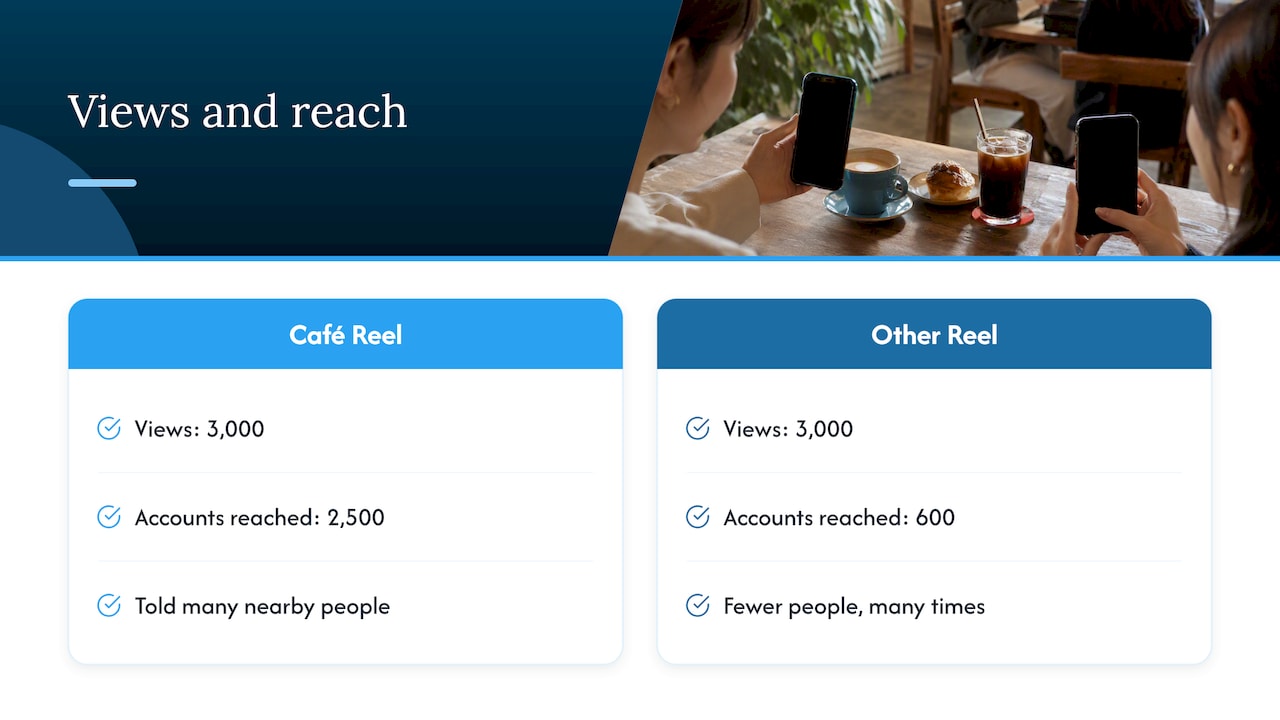
For a local business, reach and the number of people who actually act matter more than the headline view figure. A café with 3,000 views and 2,500 accounts reached has told a lot of nearby people it exists. A Reel with 3,000 views from 600 accounts has told fewer people, many times.
We also see that visible numbers shape how people respond. A Reel that already shows a healthy view count looks worth watching, and that first impression can help a good Reel get a fair chance. That is the reason some creators and brands choose to add views to a Reel they have already made well, as a supplement to good content and never a replacement for it. We would always start with the content: a strong first second, a clear subject and a reason to watch to the end. Then look at reach and watch time to see whether it landed.
— Irwin Lee
When adding views makes sense
The view counter is a social signal. A new account with a good Reel and a count of 40 can look quiet, and a count in the thousands can make a visitor more willing to watch. If you decide to support a Reel that way, keep the expectations realistic: added views raise the visible count, but your reach, watch time and saves still come from how people respond to the content itself.
Our Instagram Reel views are priced from £0.59 and go up to £54.99 one-off depending on the package size, and delivery needs no password. You can see the packages on our Instagram services page, or read our guide to buying Instagram Reel views in the UK before you choose. If you want to understand the safety side first, we cover it in growing Reel views safely.
Common mistakes when comparing plays and views
- Treating views as people. Divide by reach to get views per account, and use that as your repeat-viewing indicator.
- Comparing across the 2024 change. The label changed, replays disappeared from reporting and the aggregation differs, so old and new numbers are not a clean pair.
- Ignoring watch time. A high count with very short watch time points to a weak opening or the wrong audience.
- Switching denominators. If your engagement rate used plays or impressions before and uses reach now, the rate will jump for reasons unrelated to your content.
- Judging a Reel too early. Compare Reels at the same age.
FAQ
Are Reel plays and views the same thing now?
Yes. Meta renamed Reel and video Plays as Views in November 2024 and kept the calculation method. The separate Replays metric was removed from reporting. If you see “plays” in an older tool or screenshot, read it as views.
Does rewatching a Reel count as another view?
Yes. Views are not deduplicated by user, so a repeat start by the same account can add to the total. Before the change, replays were reported separately and then added into total plays. Now they simply sit inside the view count.
What does 100 plays or views on a Reel mean?
It means the Reel started to play 100 times. Those starts could come from 100 accounts or from far fewer people watching more than once. Check reach to see how many unique accounts that was.
What is the difference between views and reach?
Views count every occurrence, including repeats. Reach counts each account once. A Reel with more views than reach has been watched more than once by at least some people, and the gap tells you how much.
Can I compare my old plays with my new views?
Only loosely. Sprinklr notes that Views is not necessarily a one-to-one replacement for older Impressions and Reel Plays, because Meta’s aggregation changed. Compare recent Reels with each other for the most reliable picture.
Sources
- Hootsuite: Changes to Instagram metrics
- Sprinklr: Instagram Reels Insights glossary
- Sprinklr: Impressions and Reel Plays deprecation and introduction of Views
- Sprout Social: Total Plays now included in Facebook and Instagram Reels reporting
- Sprout Social: Meta Instagram Reel Views and deprecating Impressions
- Sprout Social: How to analyse Instagram Reels analytics
- Emplifi: How to approach Instagram and Facebook views and impressions
- Zoomph: Instagram metric deprecation and Views transition
- Maximise organic reach for your business
- Instagram event promotion