

The obvious choice may be the wrong one: a quiet YouTube channel can still be worth reviving, but an audience built around different content may make a fresh start more sensible. Reviving a dead YouTube channel starts with evidence, not a burst of uploads.
It’s understandable to see low views and wonder whether old subscribers are holding the channel back. A better test is whether the channel’s audience, past performance and future content still fit together.
This guide shows you how to assess analytics, audience feedback and content gaps, then weigh keeping your existing channel against starting again. You’ll have a practical basis for choosing your next step, rather than relying on subscriber numbers alone.
Key Takeaways
- Use viewing patterns, audience demographics and feedback to see whether your existing viewers still connect with your content.
- Review your strongest and weakest videos to uncover topics worth revisiting and gaps your next uploads can address.
- Keep the existing channel when its audience still fits your direction; consider a new one when the content shift would leave subscribers behind.
- Factor in channel status before deciding: YouTube may turn off monetisation after six months or more without an upload or a post to the Posts tab.
Assessing channel analytics, audience demographics, and feedback
Start by comparing recent performance with the channel’s own history. Reviving a dormant YouTube channel works best when analytics, viewer feedback and content direction point to the same audience.
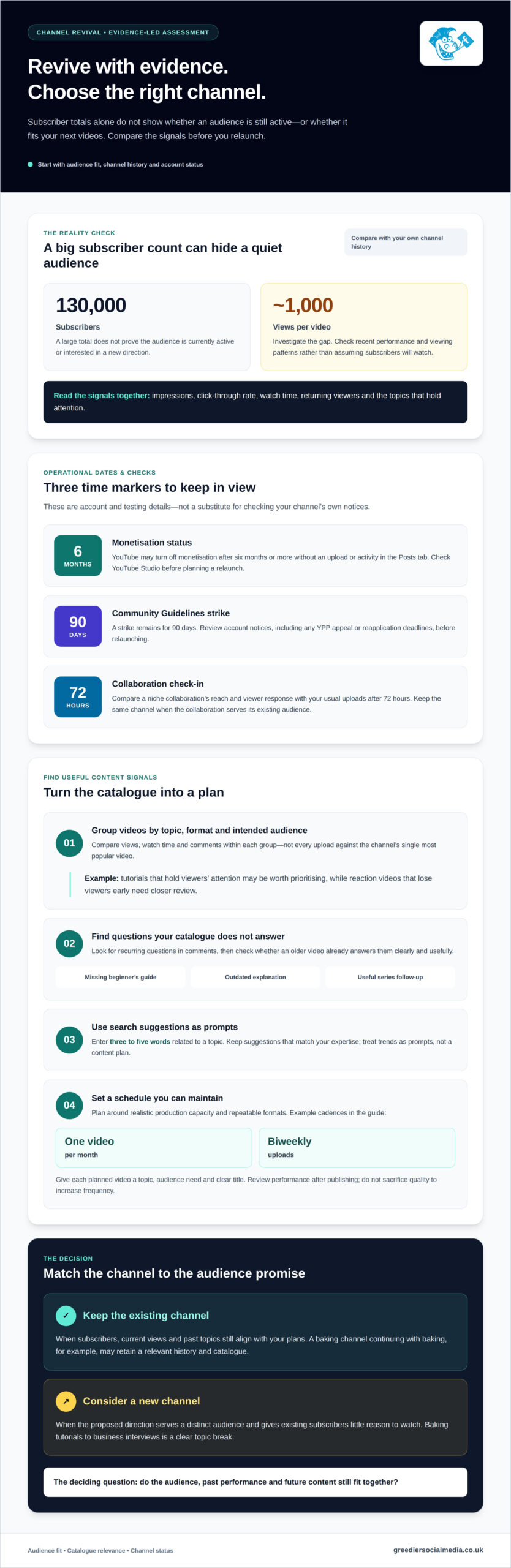
- Review YouTube Analytics across your recent uploads. Compare impressions, click-through rate, watch time and returning viewers, then check which topics retain attention. A channel with 130,000 subscribers but around 1,000 views per video needs to investigate the gap, not assume its subscriber count reflects an active audience.
- Check audience demographics and viewing habits before planning a relaunch. Compare the age, location and interests of current viewers with those of the people your next videos are meant to reach. If your old audience came for gaming videos but you now plan cooking content, existing subscribers may not be a good match.
- Read comments and respond to specific feedback. Ask viewers what they want to see next, and use a Community poll to test a topic before making a full video. Repeated requests for a series can signal that some viewers still want the channel’s original content.
- Keep old videos that still represent your direction or attract relevant viewers. Consider whether videos that no longer fit should remain visible or be removed, based on their relevance to your current direction. This preserves useful catalogue content and makes the channel’s current focus easier to understand.
- Check monetisation and policy status in YouTube Studio. YouTube may turn off monetisation after six months without an upload or Posts tab activity. A Community Guidelines strike remains for 90 days; YPP decisions also have appeal and reapplication deadlines, so review any account notices before relaunching.
- Test a collaboration with a creator in your niche to introduce your videos to a relevant audience. Compare its reach and viewer response with your usual uploads after 72 hours. Keep the same channel when the collaboration and your planned content serve the audience you already have.
Auditing channel performance and content gaps
- Group existing videos by topic, format and intended audience. Compare views, watch time and comments within each group instead of judging every upload against the channel’s most popular video. For example, if tutorials consistently hold viewers’ attention but reaction videos lose them early, prioritise tutorials and investigate what viewers value about them.
- Find content gaps by comparing audience questions with your video catalogue. Note subjects that come up repeatedly in comments but lack a clear, useful answer. Then check whether older videos cover those questions adequately. A gap might be a missing beginner’s guide, an outdated explanation or a useful follow-up to a popular series.
- Before changing direction, compare your current views and subscriber base with the audience for the proposed topic. A gaming channel moving into technology reviews could test related equipment videos first. A sharp shift to unrelated cooking content may not serve existing viewers, so consider whether the new subject needs its own channel.
- Use YouTube search suggestions to generate ideas. Enter three to five words related to a video topic, then note suggestions that match your expertise. Treat trends as prompts, not a content plan: explain a relevant development in your own format instead of copying a popular video without adding value.
- Build a calendar around realistic production capacity and repeatable formats. Set a schedule you can maintain, such as one video per month or biweekly uploads, and give each planned video a topic, audience need and clear title. Review performance after publishing, then adjust the next entry. Don’t sacrifice video quality to increase upload frequency.
Choosing between reviving an existing channel and starting a new one
Decide based on audience fit, not subscriber totals alone. Audit the catalogue, then compare the likely value of its existing videos with your planned direction.
Audit existing videos
Review each video’s topic, current relevance and fit with your intended content. Separate useful videos that still represent the channel from outdated uploads or material that could confuse new viewers. For example, a dormant photography channel with practical camera tutorials may have a useful foundation if its next videos cover related equipment. Avoid removing videos just because their views have slowed.
Re-optimise existing videos
Choose relevant videos and improve their titles, descriptions and tags so viewers understand what they cover. Make each title specific, then put the central topic near the start of the description. Primal Video recommends placing relevant keywords in the title and first couple of description lines. Update details only when they accurately reflect the video; optimisation cannot make unrelated content fit a new audience.
- Keep the existing channel when its subscribers, current views and past topics still align with your plans. If your channel covered home-baking tutorials and you’re continuing with baking, its history and catalogue remain relevant. Consider those signals together. A large subscriber total alone doesn’t show whether people will watch a different subject.
- Consider a new channel when the proposed direction would serve a distinct audience and give existing subscribers little reason to watch. For instance, moving from baking tutorials to business interviews creates a clear topic break. A new channel gives that content its own identity, while the old one can retain its original focus. Choose the option that makes the audience promise clearest.
Choosing between reviving an old channel and starting a new one
Base the decision on audience fit and the channel’s history, not its age alone. Use these steps to make the choice clear.
- Match the new direction to the channel’s past promise. If an old channel built its audience around budget travel, fresh UK destination guides remain a natural fit. If the plan shifts to personal finance, the topics and viewers may no longer align. A sharp change can make subscriber totals less useful as a decision measure.
- Consider what the algorithm can learn from your new uploads. YouTube recommendations respond to how viewers engage with individual videos, so a dormant channel isn’t automatically beyond recovery. Publish a focused set of videos for a defined audience, then assess whether viewers click, watch and continue to related content.
- Keep the old channel when its name, catalogue and audience still support the same subject. A home-gardening channel returning with seasonal planting advice has a coherent path forward. Retain relevant videos, update inaccurate details and use playlists to make related uploads easier to find. Consistency gives returning viewers a clear reason to stay.
- Start a new channel when the subject needs a different identity or serves a separate audience. For example, a gardening creator launching a channel about software tutorials would need a distinct catalogue and viewer promise. Don’t split content merely because recent views are low. Split when the audience and subject genuinely differ.
- Set a test and review point before committing to the decision. Publish a consistent run of videos in the chosen direction, with clear titles, descriptions and tags. Compare impressions, click-through and watch time across those uploads. If the same audience responds, continue on the existing channel; if the subject attracts a different audience, separate it.
- Choose the route that makes your next upload easiest to explain to viewers. If you’re preparing a relaunch, explore support for your YouTube channel alongside a focused content plan.
Greedier Social Media
Greedier Social Media offers paid engagement options for creators building visibility across social platforms. Once you’ve chosen a clear direction for your YouTube channel, Instagram Followers and Instagram Likes can support your wider social presence. They don’t replace relevant videos, audience research or a consistent publishing plan, but may suit creators seeking paid Instagram engagement alongside a channel relaunch.
Choose support that matches your wider goals. Auto Instagram Followers and Auto Instagram Likes are also available for Instagram profiles. Keep your YouTube decision grounded in audience fit and content direction, and use other platform options only when they make sense for your overall presence.
Contact Greedier Social Media to discuss your social media goals.
Make your next upload a deliberate choice
Treat your channel audit as a decision point, not a verdict on your past work. Choose one direction, shape your next video for the viewers you want to reach, then use its performance to guide what comes next. This keeps your relaunch focused and gives you a practical basis for adjusting your approach.
Reviving a dead YouTube channel takes a clear audience and a reason for viewers to return. If your next step also involves strengthening your wider social presence, Greedier Social Media offers Instagram engagement options to complement your plans. Keep the decision grounded in what fits your goals, rather than adding activity without a clear purpose.
Contact Greedier Social Media to discuss your social media goals. With a focused next step, you can move forward with greater clarity.
Frequently Asked Questions
Can a dead YouTube channel be revived?
Yes. Reviving a dead YouTube channel is possible when you publish content that gives viewers a reason to return. Treat “dead” as a description of low activity, not a permanent status. For example, a channel with older evergreen tutorials might restart with updated versions, making its return useful to past viewers and discoverable to people with the same questions today.
What happens when a YouTube channel dies?
A quiet channel usually sees fewer viewers engaging with new uploads, but “dead” isn’t a formal YouTube channel status. Existing videos and the channel itself may remain available. The practical impact is reduced momentum: returning viewers may not know what to expect, and new visitors may see an unclear mix of old topics. A consistent, relevant return helps reset that impression.
How do you diagnose why a YouTube channel stopped growing?
To understand why reviving a dead YouTube channel may be difficult, map when growth slowed against changes in topics, formats, titles and upload habits. In YouTube Analytics, compare videos from before and after the slowdown. If impressions fell, distribution may have narrowed; if impressions held but clicks fell, the titles or thumbnails may need attention. If viewers leave early, check whether the opening delivers what the title promised.
Should you revive an old YouTube channel or start a new one?
For reviving a dead YouTube channel, use the old one if its identity and archive still support your planned content. Start fresh if the name, past material or audience would mislead people about the new subject. For example, a channel named for a former project may confuse viewers after a complete rebrand. Choose the option that makes your topic clear from the first visit.
How does YouTube’s algorithm treat inactive channels and old subscribers?
Inactivity alone doesn’t establish that YouTube has permanently suppressed a channel. Old subscribers may be less interested or no longer active, so their presence doesn’t guarantee views on new uploads. Treat each return video as a fresh audience test: make its topic clear, then observe how viewers respond. A relevant upload can reach interested viewers beyond the existing subscriber base.
How often should you upload when restarting a YouTube channel?
Choose a schedule you can sustain without lowering video quality. One video per month is a workable starting point; biweekly uploads give you more opportunities to test topics if production allows. For example, plan a monthly tutorial series before increasing frequency. Keep the format manageable, then use audience response and your available production time to decide whether a faster schedule makes sense.