
Publishing more often won’t automatically grow a YouTube channel faster. To fast track YouTube channel growth, build video ideas around what your audience wants, give each video a clear title and thumbnail, then use performance data to guide your next upload. Set a pace you can sustain instead of making volume the goal.
It’s easy to assume that more uploads mean more progress, especially when growth feels slow. A consistent schedule can help, but strong ideas and viewer response matter too. This guide explains how to find promising topics, improve your video packaging and production, and use analytics to identify what’s worth repeating.
You’ll also learn how to promote videos through email, social media and blog posts, and choose an upload frequency that fits your process. The aim is a clear, repeatable plan: publish with purpose, learn from each video and build momentum without sacrificing quality.
Key Takeaways
- Make each thumbnail and description support the same clear promise, then refresh metadata when a video’s topic becomes relevant to new searches.
- Use viewer behaviour to identify where a video holds attention and where its production could be clearer or more engaging.
- Extend a video’s reach by sharing it through relevant email, social media and blog content.
- Choose an upload pace you can sustain, and judge it by the response each video earns rather than volume alone.
Creating thumbnails and optimised descriptions
A video title names the video and signals its subject. Keep it clear, concise and relevant to the words viewers are likely to search for. For a home-baking video, “How to Make Flaky Cheese Scones” describes the result more clearly than “You’ll Love This”. A precise title sets an accurate expectation before someone clicks.
A thumbnail is the still image representing a video in YouTube’s listings. Use one strong focal point, readable text and a clear visual connection to the topic. For the scone example, show the finished bake close up rather than a cluttered kitchen scene. Keep the design consistent across a series, while making each image distinct enough to identify its format.
Titles and thumbnails can encourage clicks by making a video’s subject and benefit easy to understand. The opening hook supports retention by quickly delivering on that promise and showing viewers what comes next. If the title promises a simple recipe, begin with the finished scones or the first practical step, not a long introduction.
A video description appears beneath the video and explains its content, giving viewers useful context. Put the main topic in the opening lines, then add relevant details such as ingredients, chapter points or related video titles. Use natural language. Repeating a keyword unnaturally can make the description harder to read without clarifying the recipe.
Tags are descriptive terms that connect a video with its subject. Combine broad terms, such as “baking”, with specific ones, such as “cheese scones” and “flaky scone recipe”. Treat tags as supporting details; make the title and description useful to people first. After several months, review older metadata and update it if the video matches current search queries. Check that revised titles, thumbnails and descriptions still accurately represent the video, so new subscribers know what to expect after clicking.
Improving production quality and using analytics
Production quality is how clearly a video delivers its content through sound, visuals and editing. Start with clean audio, steady framing and lighting that makes the subject easy to see. For a cooking video, show ingredients clearly and reduce background noise. Edit out pauses that interrupt the demonstration, but keep the steps viewers need to follow. A plan to fast track YouTube channel growth should prioritise clear communication, not expensive equipment.
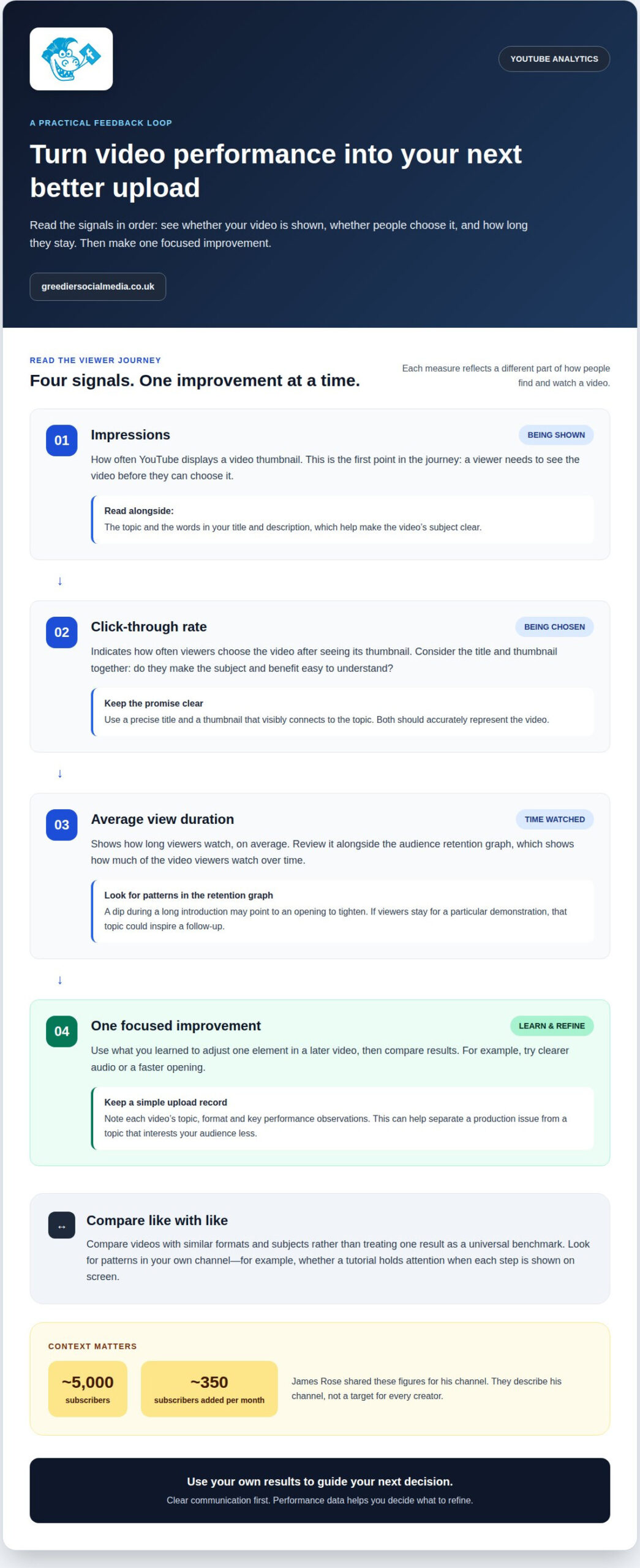
YouTube analytics measure how viewers discover and watch channel content. Review impressions, click-through rate and average view duration together. Impressions show how often YouTube displays a video thumbnail. Click-through rate indicates how often viewers choose the video after seeing its thumbnail. Average view duration shows how long viewers watch, on average. Each metric reflects a different part of the viewer journey.
After publishing, check whether people click, then look for dips in the audience retention graph. It shows how much of the video viewers watch over time. If viewers leave during a long introduction, tighten the opening in future videos. If they stay for a particular demonstration, consider making that topic a follow-up. Use each finding to make one focused improvement.
Compare videos with similar formats and subjects instead of treating one result as a universal benchmark. James Rose says his channel has around 5,000 subscribers and adds around 350 subscribers per month. Those figures describe his channel, not a target for every creator. Use your own results to spot patterns, such as stronger retention when a tutorial shows each step on screen.
Record each upload’s topic, format and key performance observations. This helps distinguish a production issue from a subject that interests your audience less. Improve one element at a time, such as clearer audio or a faster opening, then compare later videos. To fast track YouTube channel growth, let those comparisons guide your next decisions. If you’re building your presence beyond YouTube too, explore support for your social growth.
Promoting videos through email, social media and blog posts
Email promotion is sharing a video with people who have chosen to receive your updates. Send a message that explains the video’s practical value, then link directly to it. A baking channel could email a new recipe video to subscribers who regularly read its baking updates. One page reports an average email opt-in rate of 2%, but your results depend on the audience and sign-up experience.
Social media promotion means adapting a video’s message for other platforms. Share a short, relevant excerpt or useful takeaway, then direct interested viewers to the full video. For a gardening tutorial, post a clip showing one planting step, with context that makes sense without sound. Tailor each post to its platform instead of copying the same caption everywhere.
A blog embed is a YouTube video placed within a relevant article on your own blog. Add the video where it helps explain the subject, then write useful text around it. A post about pruning roses could embed a demonstration video beside the relevant instructions. One creator reports that blog embeds account for an average of 17% of their videos’ views, an example rather than a universal result.
YouTube advertising is paid distribution that places videos in advertising inventory. Costs depend on campaign settings, bidding, audience and advertising format, so there is no single price for every campaign. Consider paid promotion when you have a defined audience and a clear way to assess whether the campaign supports your objective.
YouTube recommendations are personalised video suggestions based on signals such as viewing activity and how viewers respond to content. Search results match a viewer’s query with relevant video information and engagement. Improve discoverability by making the topic clear in the title and description, then share the video with people likely to value it. A clear route from a gardening blog post to its pruning video gives readers context before they watch. Track where views come from in analytics, then prioritise the channels that bring engaged viewers.
Upload frequency among fast-growing YouTube channels
Upload frequency is how often a channel publishes videos over a set period. It matters, but the available channel-growth figures show why volume alone is a poor target. In a September 2026 census, channels posting fewer than eight times monthly had median gains of roughly 98,800 subscribers per upload. Regular posters publishing 8 to 29 times gained roughly 16,100 per upload, while heavy posters publishing 30 to 59 times gained roughly 6,100.
Those figures describe a selected group of fast-growing channels, not a result to expect from every upload schedule. The same census found one channel gained 511,000 subscribers on a single upload whilst posting fewer than eight times monthly. Six channels reached the tracker’s ceiling of 800 uploads in 30 days. Neither example proves that publishing less or more causes growth. The subject, format and viewer response matter too.
A practical 30-day plan is a focused publishing cycle for testing ideas, reviewing results and adjusting the next uploads. Start by choosing a clear audience and planning related videos. Publish at a pace that leaves enough time for production, then review views and subscriber changes across the cycle. Use the strongest viewer response to shape the next batch of ideas. Keep the pace manageable enough to repeat.
Buying views or subscribers can create policy and channel risks if it artificially inflates engagement. Prioritise genuine viewer interest and policy-compliant growth. Artificial engagement can distort analytics and put channel standing or monetisation at risk.
For YouTube Partner Programme eligibility in the UK, channels must meet YouTube’s subscriber and viewing thresholds, follow its monetisation policies and satisfy account requirements. Upload frequency alone does not qualify a channel; eligibility also depends on subscribers and eligible viewing activity.
Greedier Social Media
Greedier Social Media can support creators building a wider presence alongside their YouTube channel. If you also use Instagram to share clips, updates or behind-the-scenes content, Instagram Followers and Instagram Likes can support activity on that platform. Auto Instagram Followers and Auto Instagram Likes are available for ongoing Instagram engagement too.
These services are relevant when Instagram forms part of your wider social presence. They don’t replace developing useful YouTube ideas, publishing consistently or learning from video analytics. Keep each platform’s role clear and choose support that fits your broader audience-building plans.
If you’d like to discuss your social media needs, contact Greedier Social Media.
Put Your Next Growth Step Into Motion
To fast-track your YouTube channel’s growth, treat each upload as a chance to make a more informed decision. Choose one improvement for your next video, then use viewer response to guide what you develop afterwards. This keeps your channel moving with purpose instead of chasing every trend or publishing without direction. Progress comes from building a process you can keep refining.
If your wider social presence includes Instagram, Greedier Social Media offers Instagram Followers, Instagram Likes and Auto Instagram Followers. These options can support your Instagram activity alongside your YouTube plans, without replacing the work of creating videos viewers value.
Take the next step at a pace that suits your goals. Contact Greedier Social Media to discuss your social media needs, and keep building with purpose.
Frequently Asked Questions
How do you find stronger YouTube video ideas?
Start with questions your intended viewers already ask, then turn each into a specific video outcome. Review comments on your channel, customer enquiries and recurring themes in relevant community discussions. For example, a home-repair creator could turn repeated questions about draughty windows into a video comparing practical fixes. Before filming, check that the idea fits your channel’s focus and offers a distinct, useful answer.
How can Shorts direct viewers to your long-form videos?
Use a Short to introduce one useful moment from a longer video, then give viewers a clear route to the full topic. For a gardening tutorial, a Short could show how to prune one branch and point interested viewers to the complete demonstration. Add a related-video link where available, or direct viewers to the relevant video on your channel. Make the Short useful on its own, too.
How can you use feedback and analytics to keep improving?
Combine viewer feedback with performance patterns to decide what to change next. Sort comments into themes, such as requests for more detail, unclear instructions or follow-up topics. Then compare those themes with where viewers stop watching or return to a particular part. If several viewers ask how to adapt a recipe, make that adjustment the focus of a follow-up and assess its response separately.
How do you optimise your video titles, descriptions and tags?
Match your wording to the viewer’s specific intent, not just the broad subject. A video about sourdough might target “how to feed a sourdough starter” rather than “bread baking”. Use the description to add context that does not fit naturally in the title, such as equipment or recipe variations. Add tags that reflect genuine alternative terms, including common spellings or names viewers may use.
What makes a YouTube thumbnail worth clicking?
A useful thumbnail makes the video’s subject easy to recognise at a glance and gives an accurate sense of its content. For a room makeover, a clear before-and-after image can show the transformation without a lengthy caption. Check that the key detail remains visible when the image appears small. Avoid visual claims the video doesn’t fulfil, as a mismatch can disappoint viewers after the click.
How do you set a posting schedule you can maintain?
Build your schedule around the entire production process, not just filming. Allow time for planning, recording, editing and preparing each upload, alongside your other commitments. If a weekly release leaves no time to refine videos, choose a slower rhythm you can sustain. Planning related topics together can also make production more manageable. Review your schedule after a few uploads and adjust it to fit your workflow.